
















Equipment Needed for Online Chess Classes
Getting started with online chess lessons does not have to mean buying expensive equipment or creating a complicated home setup. Most families can begin with a suitable device, a reliable internet connection and access to the online chess platform used by their academy. Understanding the Equipment Needed for Online Chess Classes helps parents prepare a comfortable learning space without spending money on items their child may never use.
Whether your child is learning chess for the first time or improving existing skills, the right setup can make it easier to see the board, hear the coach and participate in lessons. In this guide, we explain the essentials, optional accessories and practical steps to prepare before the first class.
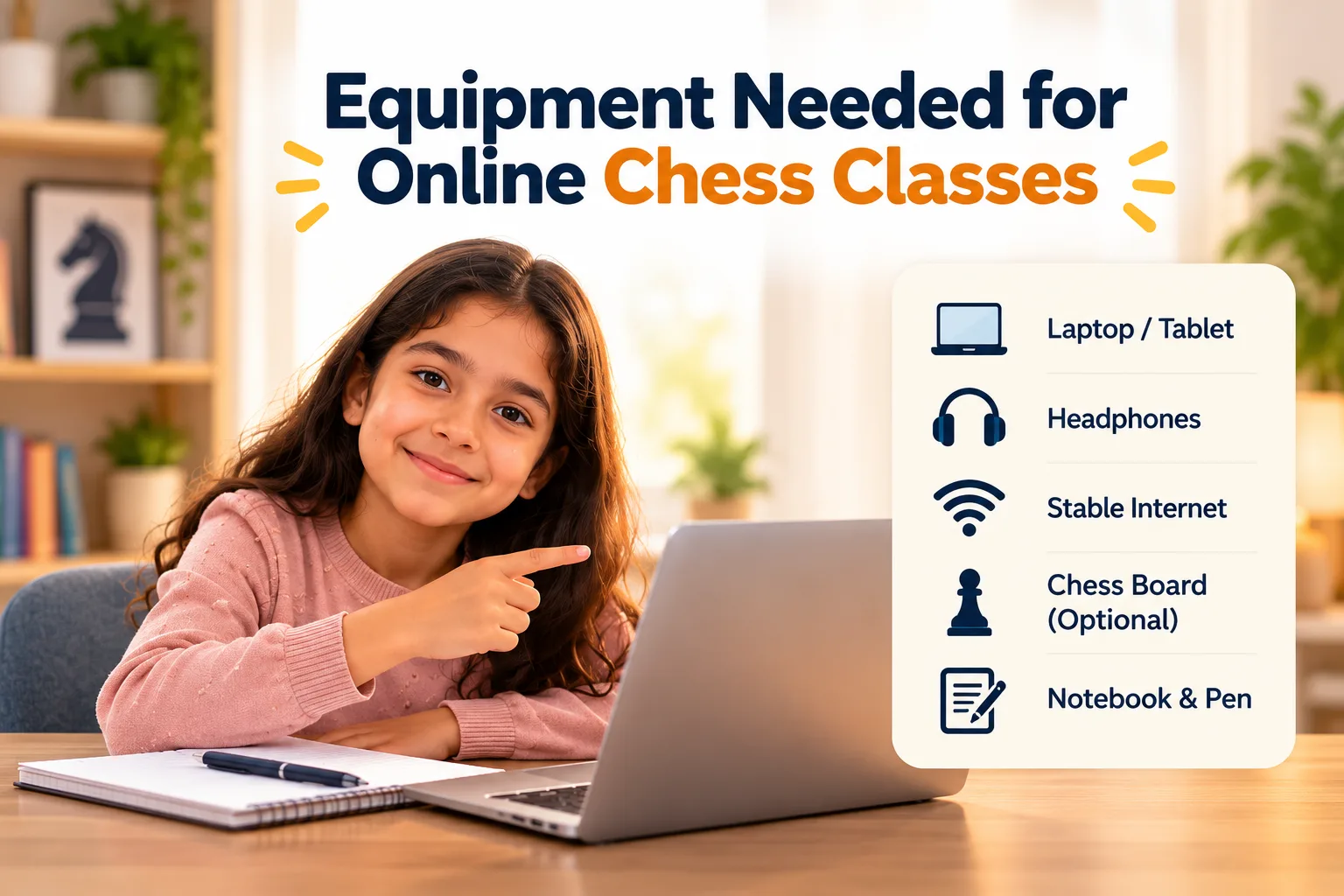
The basic Equipment Needed for Online Chess Classes usually includes a laptop, desktop computer or compatible tablet, a stable internet connection, and access to the academy's online classroom or chess platform. A working microphone and speakers or headphones are helpful for communication. A physical chessboard, external mouse and extra accessories are optional for most digital lessons. Always confirm the specific requirements with your academy before purchasing anything.
Your quick setup checklist
- A compatible laptop, desktop or tablet
- A stable Wi-Fi or wired internet connection
- Working audio through speakers, earphones or a headset
- A microphone if the lesson involves speaking with the coach
- Access to the required chess platform or video classroom
- A comfortable, reasonably quiet learning space
- A physical chessboard if your child prefers hands-on practice
1. A Suitable Device for Online Chess Classes
The first thing to consider is the device your child will use during lessons. The screen should be large enough to display the chessboard clearly, and the device should be capable of running the required website or application while supporting audio and video if needed.
You usually do not need a high-end computer just for chess lessons. A device that works reliably for everyday browsing and video calls may be sufficient, provided it supports the academy's platform.
Laptop or Desktop
A larger screen makes it easier to view the board, follow demonstrations and switch between the coach and learning materials. A laptop also gives families a convenient all-in-one setup.
Tablet
A compatible tablet can work well, particularly for children who find tapping and moving pieces on a touchscreen intuitive. Check that the teaching platform works properly on the device.
Smartphone
Some chess platforms work on phones, but a small screen can make it harder to see board details while also viewing the coach. A phone is best used when the academy confirms it is suitable.
External Mouse
A mouse can make selecting squares and moving pieces easier on a laptop or desktop, especially for children who are still getting comfortable with a touchpad.
What laptop is suitable for online chess classes?
When choosing a laptop for online chess classes, focus on compatibility and usability rather than gaming performance. For many families, the laptop they already own may be enough.
- A current, supported web browser
- A screen that makes the chessboard easy to see
- Working Wi-Fi and audio
- A webcam and microphone if video communication is required
- Enough performance to run the class platform smoothly
- A comfortable keyboard, trackpad or mouse for navigation
Before buying a new laptop, test the existing device on the platform recommended by the academy. If the board, audio and video work smoothly, an upgrade may not be necessary.
2. A Stable Internet Connection
A reliable internet connection is one of the most important parts of an online chess setup. Even when the chessboard itself uses little data, live coaching may also involve video, audio, screen sharing and interactive learning tools.
The exact internet speed required depends on the video service, number of connected devices and the platform being used. Rather than relying on one universal speed figure, check the academy's requirements and test your connection before class.
Practical tip: A stable connection is often more useful than paying for a much faster plan that still suffers from weak Wi-Fi coverage or frequent interruptions.
How to prepare your internet connection
- Place your device in an area with a strong Wi-Fi signal.
- Pause large downloads and unnecessary streaming during lessons.
- Close applications that are using significant bandwidth.
- Test the video call and chess platform before the first class.
- Keep a mobile hotspot available as a backup if practical.
- Ask the academy how to reconnect if the call drops.
What are the internet requirements for chess lessons?
Internet requirements for chess lessons depend on how the class is delivered. A lesson using only an interactive chessboard may have different needs from a session that includes continuous video and screen sharing. Follow the platform's stated requirements and test the connection under normal household conditions.
If your connection regularly freezes, try moving closer to the router, restarting the router when appropriate or using a wired connection on compatible devices. If the problem continues, contact your internet provider or the academy for troubleshooting advice.
3. Headphones, Speakers and a Microphone
Children need to hear the coach's explanations clearly and, in interactive lessons, ask questions or respond to instructions. Good audio helps make the session easier to follow.
Headphones or Earphones
These can reduce distracting background noise and make speech easier to hear. Choose a comfortable pair that fits your child's age and preferences.
Microphone
A built-in laptop microphone or headset microphone is often enough. Test it in advance so the coach can hear your child when they need to participate.
You generally do not need a professional microphone or studio headphones for a child's chess lessons. Start with the audio equipment already available, then upgrade only if communication is difficult.
If your child uses headphones, make sure the volume is comfortable and take breaks as needed. Younger children may need help adjusting the audio settings before class.
4. Do You Need a Physical Chessboard?
A physical chessboard can be a useful learning aid, but it is not always required for online lessons. Many online classes use an interactive digital board that lets the coach and student examine the same position and move pieces directly on screen.
Whether you should buy a board depends on the way your child learns and the format of the class. Ask the academy if students are expected to use a physical board or whether all activities take place digitally.
Digital Chessboard
Useful for online demonstrations, guided exercises and moving pieces in a shared position. It may be the only board needed for a fully digital class.
Physical Chessboard
Helpful for hands-on play, practising piece movements away from the screen and playing casual games with family members.
What chessboard should parents buy for kids?
If you decide to purchase a chess board for kids, look for a board with clear square contrast, pieces that are easy for your child to handle and a size that suits the available table space.
- Choose squares and pieces that are easy to distinguish.
- Check that the pieces are comfortable for small hands to move.
- Prefer a board that can be stored and set up easily.
- Consider a foldable or travel set if storage space is limited.
- Confirm whether the coach recommends a particular board size.
An expensive tournament set is not necessary for most beginners. A simple, durable board is usually a practical starting point for home practice.
5. Online Chess Platforms and Learning Tools
Hardware is only one part of the setup. Your child also needs access to the online classroom or chess platform used by the academy. The platform may provide a shared board, learning positions, puzzles or ways to review games, depending on the programme.
Some academies use one integrated classroom, while others combine a video-call service with a separate chess website. Follow the academy's instructions instead of signing up for multiple tools before knowing what is required.
Interactive Chessboard
Allows learners to move pieces, examine positions and follow the coach's demonstrations when supported by the platform.
Video Classroom
Helps students and coaches communicate when the lesson includes live discussion or video interaction.
Chess Puzzles
Give children a way to practise tactical patterns and revisit ideas introduced during lessons.
Notes and Game Records
A simple notebook or digital document can help students record useful ideas and remember what they want to practise.
These online chess learning tools can make practice more organised, but you do not need every tool available on the internet. Begin with the resources your coach actually uses and add more only when they serve a clear learning purpose.
6. A Comfortable and Distraction-Free Learning Space
A good online chess class setup is not just about computers and software. The learning environment matters too. Children need a comfortable place where they can see the screen, hear instructions and concentrate on the board.
- Use a stable desk or table and a comfortable chair.
- Position the screen at a comfortable viewing height.
- Choose a space away from television noise and unnecessary interruptions.
- Ensure the room has enough light to see the screen comfortably.
- Keep water and any required learning materials nearby.
- Help younger children log in before the class begins.
You do not need a dedicated study room. A quiet corner of a shared family space can work well if the child can participate without frequent interruptions.
7. Optional Equipment: What Is Worth Buying?
Once the basics work, you may consider a few accessories that make lessons more comfortable. However, optional equipment should solve a real problem rather than simply make the setup look more professional.
| Equipment | Essential? | When It May Help |
|---|---|---|
| Laptop or compatible tablet | Usually required | Accessing the class and viewing the chessboard |
| Stable internet | Required for live online classes | Maintaining communication and platform access |
| Headphones or earphones | Optional, often useful | Reducing background noise and improving listening |
| External mouse | Optional | Making piece selection easier on a computer |
| Physical chess set | Optional for digital classes | Hands-on practice and family games |
| Webcam | Depends on the class | Video interaction when required by the academy |
| Extra monitor or specialist microphone | Usually unnecessary for students | Specific needs, not ordinary beginner lessons |
Budget-friendly advice: Use the device, headphones and chess resources you already have. Confirm the academy's technical requirements before buying anything new. There is no need to invest in a complete gaming or streaming setup just to learn chess online.
8. How to Set Up for Your First Online Chess Lesson
A quick check before class can prevent common technical problems and give your child more time to focus on learning. Use this step-by-step routine before the first session.
-
Confirm the Academy's Requirements
Check the device compatibility, class link, required software and whether a camera or microphone is needed. Ask the academy if anything is unclear.
-
Test the Internet and Audio
Open the required platform, check that the connection is stable and make sure the coach can be heard clearly. Test the microphone if your child will speak during the session.
-
Open the Chess Platform
Sign in using the instructions provided by the academy. If the class uses a separate digital chessboard and video call, open both before the lesson starts.
-
Prepare the Learning Space
Place the device on a stable surface, adjust the seating and reduce nearby distractions. Keep a physical board or notebook nearby only if it will be useful.
-
Join a Few Minutes Early
Allow time to solve small issues with sound, login or screen display. If something fails, contact the academy using the agreed communication method.
Common Equipment Mistakes Parents Should Avoid
Buying Before Checking Requirements
Do not purchase a new computer or chessboard until you know what the class actually requires. Your existing equipment may already be suitable.
Using a Screen That Is Too Small
A phone may work with some platforms, but a larger screen is often more comfortable when the child must view the board and video together.
Ignoring Audio Problems
Poor sound can make explanations difficult to follow. Test speakers, headphones and microphone settings before class.
Installing Too Many Apps
Multiple accounts and tools can complicate the setup. Start with the platform selected by the academy and add resources only when needed.
Frequently Asked Questions
1. What equipment is needed for online chess classes?
Most students need a compatible laptop, desktop or tablet, stable internet access and the online platform specified by their academy. Headphones and a microphone are useful for communication, while a physical chessboard is optional for many digital lessons.
2. Can my child attend online chess classes on a mobile phone?
Some platforms support mobile phones, but the small screen may make it harder to see the chessboard and video at the same time. A laptop, desktop or compatible tablet is often more comfortable. Check platform compatibility with the academy.
3. Do I need to buy a physical chessboard for online lessons?
Not always. If the coach uses an interactive digital chessboard, a physical set may not be required during class. A simple physical board can still be helpful for practising piece movements and playing games away from the screen.
4. What internet speed is required for online chess lessons?
The required speed depends on the platform and whether the class includes live video, audio and screen sharing. Follow the platform's recommendations and test your connection before the first lesson. Consistent connectivity is important for smooth interaction.
5. Are headphones necessary for online chess classes?
Headphones are not always mandatory, but they can help children hear the coach clearly and reduce background noise. Built-in speakers may be sufficient in a quiet room. Follow the academy's requirements and choose a comfortable audio option.
6. Does my child need a webcam for online chess lessons?
It depends on the class format. Some lessons use live video, while others mainly rely on an interactive chessboard and audio. Ask the academy whether a webcam is required before purchasing one.
7. Do I need to install special chess software?
Not necessarily. Some academies use browser-based tools, while others require an application or a separate chess platform. Follow the instructions provided by the academy and avoid installing unrelated software you do not need.
8. What is the most budget-friendly online chess class setup?
Start with an existing compatible laptop or tablet, a stable internet connection, working audio and access to the academy's platform. Add headphones, a mouse or a physical chessboard only if they improve comfort or are required for the lesson.
Get Ready for a Smooth Online Chess Learning Experience
Preparing for online chess lessons does not require expensive gadgets or a complicated home studio. In most cases, a compatible device, reliable internet, clear audio and a comfortable learning space provide a practical starting point.
By understanding the Equipment Needed for Online Chess Classes, parents can focus on what matters most: helping their child attend lessons comfortably, participate in the activities and enjoy learning chess.
Start with the essentials, test the setup before the first class and ask the academy about any platform-specific requirements. You can add optional equipment later if your child's learning needs change.
Looking for Online Chess Classes for Your Child?
Contact Brainiac Chess Academy to ask about online coaching options, the learning platform and the setup your child may need before starting.
Ask About Online Chess Classes →Equipment requirements vary by academy, device and teaching platform. Confirm the technical requirements with your chosen provider before purchasing additional equipment.